Youth on Course
- 4.7
- Rating
- 50.00K
- Installs
- Free
- Price

 Analysis by App-foxy
I approached Youth on Course as a practical sports membership app rather than as a standalone golf game or coaching tool. Its purpose is straightforward: give members a mobile way to access the benefits connected with Youth on Course. That narrow focus is important, because the app makes the most sense when you already belong to the program. If you are looking for swing analysis, live scoring, course discovery, or a general-purpose golf planner, this is not trying to replace those services.
My overall impression is positive, mainly because the app has a clear job and does not pretend to be something broader. It is free, aimed at an Everyone audience, and comes from Youth on Course, so the experience is centered on membership access rather than advertising a huge collection of unrelated sports tools. The Android release history begins in late 2019, and the current version is 3.0.3, which gives it the feel of an established companion app rather than a brand-new experiment.
The public response is encouraging: it holds a 4.7 average from around 284 ratings, with over 50 thousand installs. Those figures suggest that many users find the basic experience worthwhile, although they should not be mistaken for proof that every member will have the same experience. A membership app lives or dies by account accuracy, benefit availability, and how clearly it explains the next step, not just by its store rating.
You May Also Like

 AccuWeather: Weather Radar
AccuWeather Review: A Quick, Clear Forecast for Everyday Decisions
For everyday plans, the best forecast is the one you can understand quickly. AccuWeather makes rain timing, radar, and local conditions easy to act on, with a few trade-offs.

 Hill Climb Racing
Why Hill Climb Racing Still Turns Crashes Into One More Run
A tiny car, a bumpy hill and one more upgrade: Hill Climb Racing keeps resurfacing because its simple chaos makes every near-miss feel personal.

 AliExpress - Shopping App
AliExpress Makes Global Shopping Feel Personal, but Shoppers Bear the Risk
AliExpress turns a global marketplace into a pocket-sized discovery engine. Its reach is useful, its shopping loop compelling, and its trade-offs easy to miss.

 Lords Mobile: Kingdom Wars
Lords Mobile Is a Kingdom-Building Routine, Not a Quick Match
A case-by-case verdict on the building, battles, device demands, and social commitments that make Lords Mobile rewarding for some players and exhausting for others.

 PDF Scanner app - TapScanner
TapScanner Makes Paperwork Easier to Capture, Check, and Share
TapScanner makes scanning with a phone feel less like a rescue operation and more like a dependable step in getting work done. Its capture tools are useful, though not flawless.

 Block Blast!
 Shows How Much a Puzzle Game Can Leave Out
A quiet grid game shows why puzzle players increasingly value instant clarity, repeatable skill and low-pressure play—and where the genre still needs to catch up.
More From Our News Desk
View All News


What the app is really useful for
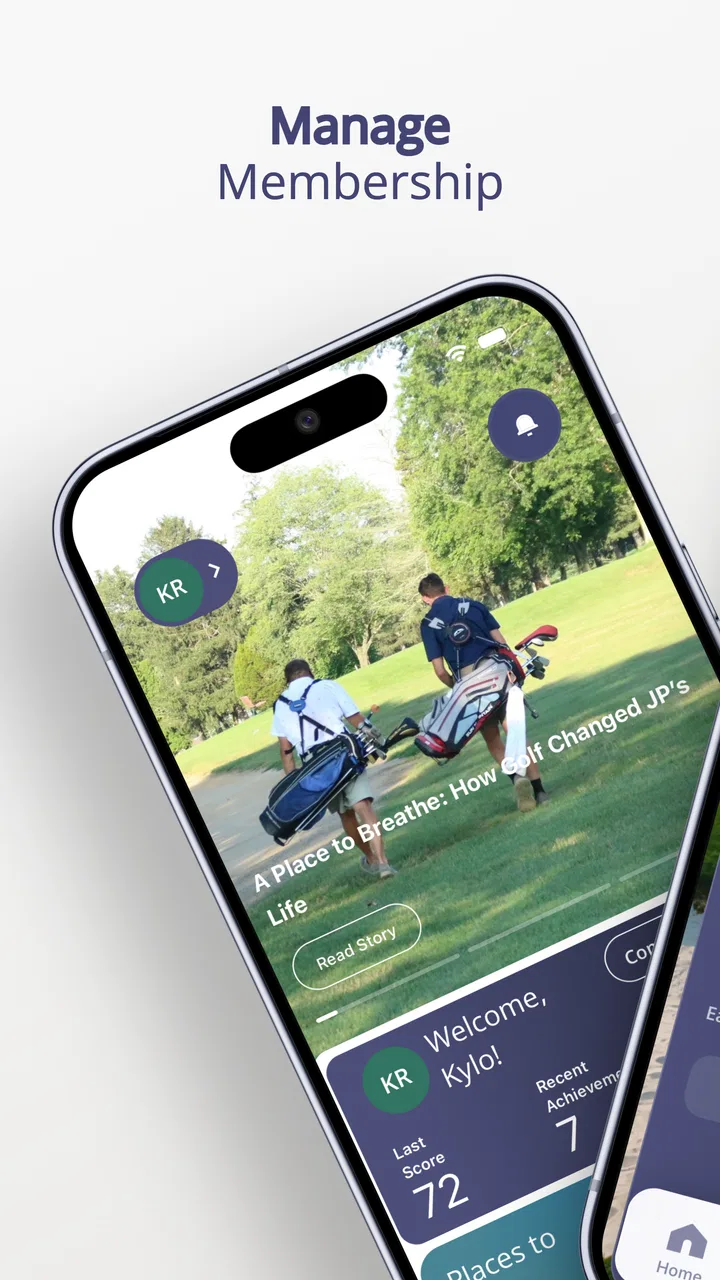
The best way to understand this app is to imagine a young golfer preparing to use Youth on Course benefits away from home. Instead of treating membership information as something that only lives in an email or on a website, the app puts the relevant access point on a phone. That can be especially useful before leaving for a course, when a parent wants to help a child check the account, or when a member needs a quick reminder of how the program connects to their golf plans.
I would not install it expecting a rich daily sports dashboard. Its value is more situational. You may use it heavily when arranging a round and hardly touch it between visits. That is not a weakness by itself; it is a sign that the app is a membership utility. The right question is not whether it offers endless screen time, but whether it reduces friction at the moment you need your benefits.
A realistic example is a weekend round planned with a family. The young player can open the app before heading out, check the membership-related information available there, and avoid searching through old messages. A parent can also use the same phone-based access point when helping with the practical details. The benefit is small but meaningful: fewer forgotten details and less dependence on scattered paperwork.
There is also a useful distinction between having the app and being eligible to use it. Installing it does not turn someone into a Youth on Course member. The app is most relevant after membership has been arranged, and its usefulness depends on the account information connected with that membership. If you are simply curious about golf programs, you may get more value from learning about Youth on Course directly before treating this as an essential download.
Where it fits among golf apps
Compared with a golf GPS app, this is more specialized and less useful during the actual swing or round. A GPS tool normally focuses on distances, maps, hazards, or scorekeeping. Youth on Course serves a different purpose: it connects the member with program benefits. Comparing the two as if they were competing products would be misleading. Many golfers could reasonably use both, because one helps with playing and the other helps with membership access.
It also differs from a club-management app. A club-management platform may organize tee times, handicap information, or bookings across many venues, while this app is tied to the Youth on Course relationship. That narrower scope can be an advantage for members who want a focused place for their program details, but it is a limitation for anyone hoping to manage every part of golf in one application.
The same trade-off applies to parents. A family organizer may prefer one broader calendar or communication tool for all activities, but that tool will not necessarily provide the membership-specific access offered here. I see Youth on Course as a companion layer, not a replacement for a family schedule, a course booking service, or a golf performance app.
Trust, account access, and visible control
Because this app deals with membership benefits, trust matters more than visual polish. I pay attention to whether the app makes it clear what I am accessing, which account is active, and what action I am expected to take next. A useful membership app should help me distinguish between a general information screen and a benefit that is actually available to my account. That distinction is especially important when a young player and a parent share responsibility for the phone.
The developer is Youth on Course, which gives the app a direct connection to the program it represents. That is preferable to relying on an unrelated third-party utility that merely collects membership details. Still, a recognizable developer name should not replace careful checking. I would review the account screen before relying on the app for a planned round, particularly if the membership was recently created, renewed, or changed.
My practical advice is to treat the first launch as an account-verification step. Confirm that the app is showing the intended member, look for any visible status or benefit information, and make sure the contact details used for support are current. This is a more reliable habit than waiting until you are standing at a course and discovering that an old account is still active on the phone.
Another useful habit is to keep the app updated through the official Android store. The current version is 3.0.3 and the minimum Android requirement is 7.0, so compatibility should cover many older phones, but an older installation can still create avoidable confusion if the account flow has changed. Updating is not a guarantee that every issue disappears; it simply removes one common source of friction.
On the trust side, I would also read the permission prompts and privacy choices as they appear rather than approving everything automatically. The safest approach is simple: grant only what the app clearly needs for the action you are trying to perform, and revisit those choices in the phone’s settings if your use of the app changes. I would not infer anything about data handling from the app’s price or rating alone. Free does not automatically mean private, and a high rating does not explain account controls.
Moments when data deserves extra attention
Membership apps can feel harmless because they are not entertainment platforms, but they may still sit close to personal account information. The sensitive moments are usually not the ordinary browsing screens; they are sign-in, profile changes, support requests, and any step involving a child’s membership. I would slow down during those actions, check which account is selected, and avoid entering information on a shared device unless I am comfortable with the device’s security.
If a parent manages the phone, I would make the account relationship explicit before handing the device to a young player. That prevents a common practical mistake: assuming that the person holding the phone is the member whose benefits are displayed. A quick account check before a round can save more trouble than trying to correct the mismatch at the last minute.
I also recommend avoiding screenshots of membership details when they are not needed. Screenshots can remain in photo backups or shared albums long after the original purpose has passed. Using the app directly keeps the information in its intended context and gives the user a better chance to notice whether the account is current.
When contacting support, I would share only the details needed to identify the issue. A clear explanation of the problem is usually better than sending a full collection of personal documents or unrelated account information. This is not a criticism unique to Youth on Course; it is a sensible boundary for any app connected to a membership account.
How much control does the user have?
The most important form of user agency here is knowing when the app is merely displaying membership access and when it is asking me to make an account decision. I prefer to pause before confirming changes, especially on a family device. If the app presents a sign-out, profile, or account-management choice, I would read the wording carefully rather than tapping through quickly.
For parents, the app works best when it is part of a simple routine: the adult checks the account setup, the young golfer learns where the relevant membership information appears, and both know who to contact if something looks wrong. That arrangement gives the child useful independence without pretending that every account issue should be handled alone.
For older members using their own phone, the routine can be lighter. Keep the login method private, turn on the phone’s normal screen security, and check the displayed membership information before making plans around it. These are ordinary steps, but they matter more than cosmetic features in an app whose central task is access.
I would also be cautious about uninstalling the app as a first response to a problem. Removing it may clear the local experience without addressing an account or membership issue. It is better to note the exact screen and message, check the account, update the app, and then use the appropriate support route. That workflow creates a clearer record of what went wrong and avoids repeating the same setup steps blindly.
Everyday strengths and practical friction
The strongest quality is focus. Youth on Course is not burdened by unrelated golf tools, so a member can approach it with a specific expectation: access the benefits associated with the program. The free price removes a separate purchase decision, and the Everyone rating makes it easier for families to consider it as part of a young golfer’s routine.
Its second strength is convenience at the right moment. A phone is usually already present on the way to a round, and a dedicated membership app is easier to remember than a chain of old messages. That convenience becomes more valuable when a parent is coordinating transportation, equipment, and course plans at the same time.
The main limitation is equally clear: the app’s usefulness is tied to Youth on Course membership. Someone outside the program will not get the same value from it, and a golfer wanting performance analysis or on-course measurement should choose a different category of app. Even members may find that they still need other tools for scheduling, navigation, scorekeeping, or training.
There is also a psychological friction that comes with focused utilities. Because you may open it only around a planned round, you can forget how the account flow works between uses. My solution would be to open it a little before leaving, not at the course entrance. That gives time to update, sign in again if necessary, or resolve an account question without pressure.
The rating of 4.7 is reassuring, but I would interpret it alongside the app’s scale and purpose rather than as a promise of perfection. Around 284 ratings and over 50 thousand installs show a meaningful user base, yet a membership utility can still behave differently depending on account state, device, and timing. A smooth experience for one member does not automatically settle a specific account problem for another.
Who should use it, and who should skip it?
I would recommend it to an active Youth on Course member who wants a direct mobile route to program benefits. It is also a sensible choice for a parent supporting a young golfer, especially when membership information needs to be checked away from a desktop. The app is most valuable to people who prefer having one dedicated place for this relationship instead of searching through messages or browser tabs.
I would skip it if you are looking for a complete golf companion. It is not the right primary choice for someone whose priority is swing improvement, detailed statistics, GPS distances, or a general tee-time marketplace. Those needs call for specialized tools, and adding this app will not remove the need for them.
I would also hesitate to make it central to a group’s planning if nobody has confirmed which member account is being used. The app can support coordination, but it cannot replace clear communication between the family, the player, and the membership holder. Set up the account first, then build the routine around it.
My cautious verdict
Youth on Course succeeds by staying close to its purpose. I found the idea more useful as a membership-access companion than as a broad sports application, and that is exactly how I would recommend approaching it. Its free availability, family-friendly age rating, established release history, and strong average rating make it easy to try, while the developer’s direct connection to the program gives the app a sensible place in a member’s routine.
My recommendation comes with one condition: verify the account and understand the visible choices before relying on the app for a planned round. Keep personal information limited to what is necessary, pay attention to permission prompts, and use a separate golf app when you need course tools or performance features. Those habits make the experience more dependable without expecting this focused utility to do a job it was not designed to do.
The best reason to install it is simple access to Youth on Course membership benefits, not an all-in-one golfing experience. For an active member, that can be enough to justify keeping it on the phone. For everyone else, the app is likely too specialized to become a regular part of their sports setup.
FAQs for Youth on Course
01What is Youth on Course and how does it work?
Youth on Course is a membership program aimed at making golf accessible and affordable for young players. Members pay a small annual fee and gain access to golf courses at significantly reduced rates, typically $5 or less. The program partners with courses across various regions, offering young golfers the chance to play at participating locations.
02How can I become a member of Youth on Course?
To become a member, visit the Youth on Course website and register online. You'll need to provide some basic information and pay the annual membership fee. Once registered, you will receive a membership card or digital ID that you can use at participating courses to access discounted rates.
03Are there any age restrictions for joining Youth on Course?
Yes, Youth on Course is designed specifically for young golfers. Typically, the program is open to individuals aged 6 to 18. However, age requirements can vary slightly depending on the region or specific golf association rules, so it’s best to check the details for your area on the Youth on Course website.
04What benefits does Youth on Course provide besides discounted rounds?
In addition to affordable golf, Youth on Course offers various benefits, including access to educational resources, scholarships, and internships. The program aims to support young golfers not just on the course but also in their academic and professional development, fostering a well-rounded approach to growth and learning.
05Can I use Youth on Course membership at any golf course?
Youth on Course membership can be used at participating golf courses that have partnered with the program. While the list is extensive, it doesn't include every course. Members should check the Youth on Course website or app for a directory of available courses to ensure they can take advantage of the discounted rates at their desired location.
Pros
- Affordable membership fees for youth.
- Access to numerous golf courses.
- Encourages healthy outdoor activity.
- Great for skill development in golf.
- Fosters a sense of community.
Cons
- Limited to participating locations.
- Requires adult supervision for minors.
- Membership renewal needed annually.
- Some courses may have restrictions.
- Weather can affect availability.

Youth on Course
Gallery